Branch, changes & PR
Branch, worktree, change counts, conflicts, ahead/behind, upstream, origin repo, and pull-request status.
Statusline for Claude Code · built for Software 3.0
Fast, themeable, and offline. agentline reads the stdin payload Claude Code sends, renders git, tokens, context window, rate limits, and session info across 39 configurable widgets, and exits. No network on the render path. No native modules. No plugin scaffolding.
# 1. install the CLI
npm install -g @odere-pro/agentline

# 2. wire into Claude Code (statusLine + skills + themes)
agentline reset

# 3. verify the wiring
agentline doctor

# 4. customise widgets, theme, and layout (TUI)
agentline edit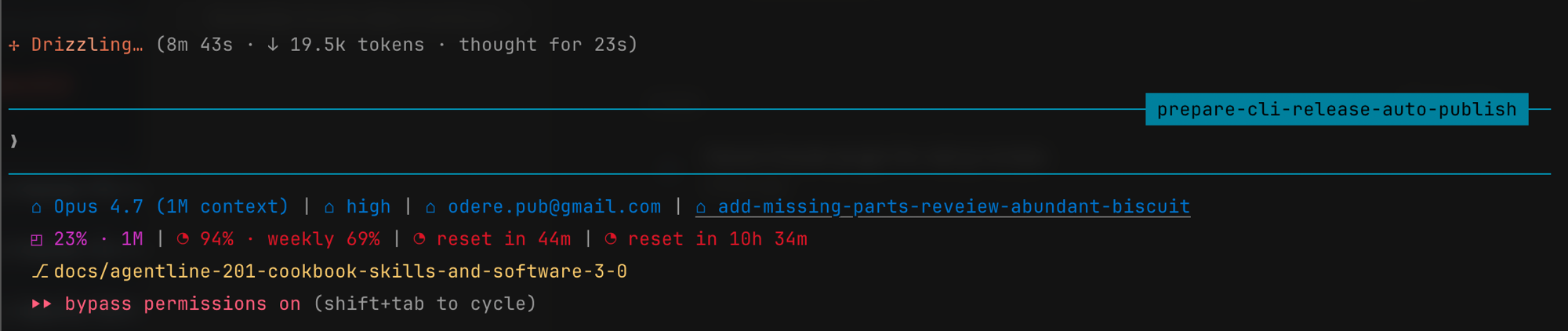
Why agentline
39 widgets across 6 families, each covering one slice of session status — composed into up to three statusline rows, then styled by a theme engine that degrades gracefully on any terminal.
Branch, worktree, change counts, conflicts, ahead/behind, upstream, origin repo, and pull-request status.
Input and output token counts, cached tokens, throughput, session cost, and burn rate.
Window percentage used, colour-graded as fill approaches the limit.
Session and weekly quota usage with countdown reset timers.
Model, version, thinking effort, plan link, project, session id, and account.
Arrayed chevrons and caps, plus a theme engine that degrades from truecolor to 256-colour to 16-colour terminals.
agentline edit opens a live-preview editor with a
searchable, family-grouped widget picker.
Setup adds five agentline skills, so you can configure, theme, and troubleshoot it by asking the agent — without leaving Claude Code.
Uninstall restores your previous statusline byte-for-byte. The render hot path makes zero network calls.
Software 3.0 · agentic engineering
In Andrej Karpathy's framing, Software 3.0 is the era where an LLM is the runtime and natural language is the program — so the interesting design surface is the set of interfaces an agent can drive. agentline has no language model on its render path. It earns the label a different way: every interface is shaped so an agent can install, configure, theme, and troubleshoot it on its own.
The renderer reads a versioned, bounded JSON envelope on stdin and writes ANSI bytes on stdout. One adapter absorbs host drift; the agent's mental model of "what comes in" stays valid.
A deliberately flat verb table — render,
edit, doctor, reset,
uninstall, config — every verb reachable
from a single --help view.
The whole layout is editable via
agentline config widget (add, remove, move, replace,
set-option). Every mutation is pure, schema-validated, and written
atomically — a broken config is rejected before it reaches disk.
Setup copies five skill files into Claude Code. Each file's description is its dispatch contract, so the host routes natural-language requests to the right runbook — the docs are the agent's import path.
Per-directory CLAUDE.md briefings plus an
authoritative glossary keep vocabulary stable release over
release. Gates enforce parity, so prompts that cite a term keep
working.
Worked example. You ask Claude Code: "switch agentline to a high-contrast theme."
agentline config widget list --json.
agentline doctor confirms the wiring is intact.No new endpoint, no agent framework, no eval harness — five small steps, each backed by an explicit contract. Read the full thesis →
The catalogue
Pick a family to filter, or browse the whole set. Widgets accumulating tokens or quota declare an explicit reset axis — session, block, day, week, model, or effort — so totals never mix boundaries.
model
Active model id (e.g. Sonnet 4.6).
version
Claude Code version.
thinking-effort
Thinking-effort tier: low through max, plus ultracode.
plan
Active plan for the current session.
project
Project name — git repo or working-directory folder.
session-id
Short session id.
account-email
Logged-in account email.
session-duration
Host-reported session elapsed time (e.g. 12m 30s).
lines-changed
Host-reported lines added and removed this session (e.g. +156 −23).
thinking-enabled
Whether extended thinking is on (complements effort).
project-dir
Launch-directory name (distinct from the git repo name).
cwd-path
Current working-directory path, home-collapsed and truncatable.
agent-name
Active subagent persona name.
tokens
Input + output token subtotals for the chosen reset axis.
tokens-cached
Cached-token subtotal (prompt-cache hits).
token-speed
Input + output tokens per second over the active window.
cost-usd
Host-reported session cost in USD (e.g. $1.23).
cost-burn-rate
Session spend rate in USD per hour (e.g. $1.20/hr).
api-duration
Time spent waiting on the API (absolute or % of wall).
cost-efficiency
Share of wall-clock spent in API calls, as a percent.
cost-vs-limit
Session spend against a configured budget (e.g. $1.20/$5).
context-percentage
Percentage of the model's context window used.
context-200k-flag
Badge when the prompt exceeds the 200k-token threshold.
context-cached
Session cached-token count (e.g. 0.8k cached).
session-weekly-usage
Live session + weekly usage % from Claude Code's /usage.
reset-timer
Session + weekly reset on one cell (countdown or wall-clock).
git-branch
Current branch, or short SHA when detached.
git-worktree
Basename of the current worktree.
git-changes
Staged, unstaged, and untracked file counts.
git-conflicts
Merge-conflict file count.
git-ahead-behind
Commits ahead of and behind upstream.
git-upstream
Upstream branch, e.g. origin/main.
git-origin-repo
Repo name — from the host or the origin remote URL.
git-pr
PR for HEAD's branch (opt-in network).
git-pr-review
Host-provided PR review state (approved, changes requested, …).
clock
Current time of day (24h or 12h).
added-dirs
Count of extra workspace roots added via /add-dir.
output-style
Active output style (e.g. explanatory, learning).
vim-mode
Active vim mode (NORMAL, INSERT, …).
Themes & rendering
Colour is semantic, not decorative: every widget resolves its colour from a named role, so a theme is a small JSON file you can swap or author yourself.
Optional chevrons and caps stitch adjacent segments together, with colour transitions computed between neighbours.
The engine degrades automatically: truecolor → 256-colour → 16-colour → none, matching whatever the terminal advertises.
--no-color for plain text, --no-unicode or
--ascii to swap glyphs for ASCII. NO_COLOR
is honoured too.
Five themes ship in the box —
claude-code-dark, claude-code-light,
high-contrast, ansi-minimal, and
midnight — or drop your own theme JSON into your
agentline config directory and reference it by name.
Get started
Requires Node.js 20 LTS or newer, and Claude Code run at least once.
reset is the canonical setup verb — safe to run whether
agentline is new or already set up.
# 1. install the CLI
npm install -g @odere-pro/agentline

# 2. wire into Claude Code (statusLine + skills + themes)
agentline reset

# 3. verify the wiring (add --fix to self-repair)
agentline doctor

# 4. customise widgets, theme, and layout (TUI)
agentline edit
Your settings are safe. agentline reset
backs up your existing statusLine before wiring its own.
Run agentline uninstall any time to restore it
byte-for-byte and remove the installed skills.
Already installed? After
npm i -g @odere-pro/agentline@latest, run
agentline start to adopt the new version — it rewires to
the installed binary and shows a preview, keeping your config.
Uninstall
# restore the previous statusLine, remove installed skills
agentline uninstall

# also wipe agentline config and any custom themes
agentline uninstall --purge
Questions
agentline edit for the live TUI editor, or ask the
agent in any Claude Code session to add a widget or swap the theme.
The scriptable agentline config widget subcommands
(add, remove, move,
replace, set-option) cover the same ground
from the shell.
git, tokens, and
context families cover branch, worktree, change
counts, conflicts, ahead/behind, upstream, pull-request status,
input and output token counts, cached tokens, throughput, session
cost, cost burn rate, spend against a budget, API duration, and
context-window usage with a 200k-token flag — and the
session family adds the working-directory path, clock,
output style, vim mode, and active agent name. 39 widgets across 6
families in total.
agentline uninstall to restore your previous
statusLine byte-for-byte and remove the installed
skills. Add agentline uninstall --purge to also wipe
your agentline config and custom themes. Setup takes a backup
first, so the round-trip leaves no trace.
npm i -g @odere-pro/agentline@latest, then run
agentline start. It re-wires the
statusLine to the installed binary and prints a
one-shot preview rendered through your existing config — without
overwriting it. Reach for agentline reset only when you
want to discard your config and return to the shipped default.
--no-color for plain text,
--no-unicode or --ascii to replace
separators and glyphs with ASCII, and the theme engine auto-degrades
from truecolor to 256-colour to 16-colour terminals.
NO_COLOR is honoured as well.